Design AI Experiences That,
Users Actually Trust
AI interaction design, prototyping, and design systems — purpose-built for products where AI meets real users. From prompt UX to confidence indicators.

Who It's For
Built for Teams That Need
AI-Ready Design
Product Managers
You're shipping AI features and need interfaces that make complex AI behavior feel intuitive, trustworthy, and easy to use.
Startup Founders
You need a polished, investor-ready product that stands out — AI-native UX that users love from the first interaction.
CTOs & Engineering Leads
You need a design system that scales — reusable components, design tokens, and patterns your team can build on without design debt.
Design Teams
You're adding AI features to existing products and need specialized UX patterns — confidence states, citations, fallbacks, and conversation flows.
Problems We Solve
AI UX Challenges That
Erode Trust
Users don't trust what they don't understand. These are the design problems that make AI features feel unreliable.
Users don't understand or trust AI outputs
Confidence indicators and source attribution
No way to show how confident the AI is
Visual certainty scoring and progress states
AI answers without citing sources
Inline citations with hover previews
Broken experience when AI fails or is uncertain
Graceful degradation and escalation flows
AI features aren't accessible to all users
WCAG-compliant AI interaction patterns
Design iterations take weeks, not days
Rapid Figma-to-code prototyping
What We Design
AI-Native
Design Capabilities
From prompt UX to design systems — every capability is built for products where AI meets real users.
AI Interaction Design
Prompt UX, conversation flows, and AI-native interfaces that make complex AI behavior feel natural and trustworthy to end users.
Prompt UX
Input design, context management, and suggestion systems that help users get the most out of AI — reducing prompt engineering to simple conversations.
Design Systems
Component libraries, design tokens, and pattern documentation built for AI products — reusable, consistent, and ready for your engineering team.
Rapid Prototyping
High-fidelity Figma prototypes to interactive code in days, not weeks. Test with real users fast, iterate faster, and ship with confidence.
User Research
AI-specific usability testing, user interviews, and behavioral analysis — understand how people actually interact with AI features.
Accessibility
WCAG 2.1 AA compliance for all AI features — screen reader support, keyboard navigation, reduced motion, and inclusive interaction patterns.
AI UX Patterns
Design Patterns for
Trustworthy AI
Purpose-built UX patterns that make AI features feel transparent, reliable, and easy to understand.
Confidence Indicators
Show users how certain the AI is about its outputs — visual cues that build trust and help users make informed decisions.
Citation Patterns
Link AI answers back to source documents — users can verify, explore, and trust the information they're getting.
Fallback Flows
Graceful degradation when AI can't confidently answer — escalation paths, alternative suggestions, and honest uncertainty.
Conversation Design
Multi-turn interactions that maintain context, guide users through complex tasks, and feel natural — not robotic.
What You Get
Complete Design
Deliverables Package
Every project ships with production-ready designs, a reusable design system, and developer handoff documentation.
Research & Strategy
- User interviews and persona development
- Competitive analysis and UX benchmarking
- User journey mapping and flow diagrams
- Information architecture and content strategy
UI Design
- High-fidelity mockups for all screens
- Interactive prototypes for user testing
- Responsive layouts for all breakpoints
- Dark mode and theming support
Design System
- Component library with design tokens
- Pattern documentation and usage guidelines
- Figma library with auto-layout components
- Style guide with typography and color system
Handoff & QA
- Developer-ready specs and annotations
- Design QA during development
- Pixel-perfect review and sign-off
- Accessibility audit and remediation
Design Process
From Research to
Production Handoff
A structured design process that balances creative exploration with rigorous validation — every phase builds on the last.
Research & Discovery
User interviews, competitive analysis, and stakeholder alignment — understand the problem before designing the solution.
Wireframing
Low-fidelity structure and layout exploration — test information architecture and user flows before committing to visual design.
Prototyping
High-fidelity interactive prototypes with real content — test with users, validate assumptions, and iterate rapidly.
User Testing
Moderated and unmoderated usability testing — identify friction points, validate AI interaction patterns, and measure comprehension.
Handoff & Ship
Developer-ready specs, component documentation, and design QA — seamless transition from design to code.
Timeline
From Research to Handoff in
3-8 Weeks
A structured design process with weekly reviews, user testing, and iterative refinement — no wasted time.
Discovery & Research
User research, competitive analysis, stakeholder interviews, and project scoping. Define personas and map user journeys.
Design & Iterate
Wireframes, high-fidelity mockups, and visual design. Establish design system foundations and AI interaction patterns.
Prototype & Test
Interactive prototypes, usability testing, and iteration. Validate AI UX patterns with real users and refine based on feedback.
Handoff & QA
Developer specs, component documentation, design token export, and design QA during initial development sprints.
Security & Privacy
Privacy-First
Design Process
Your data, your users' data, and your IP are protected at every stage of the design process.
Data Privacy in Research
All user research data anonymized and encrypted. Participant consent managed with GDPR-compliant processes.
Secure Design Handoff
Design files, prototypes, and assets shared through encrypted channels. Access controls on all design repositories.
PII Protection in Mockups
No real user data in prototypes or mockups. Synthetic data used for all design work — no accidental PII exposure.
Accessible by Default
Every component meets WCAG 2.1 AA standards. Color contrast, keyboard navigation, and screen reader support built in.
AI Transparency Patterns
Designs enforce transparency — users always know when they're interacting with AI, what data is being used, and how to opt out.
Design Version Control
Full version history for all design files. Every change tracked, every decision documented, every iteration recoverable.
Case Study
Real Results,
Proven Design
How FinFlow Redesigned Their AI Dashboard for 45% Faster Task Completion
FinFlow's AI-powered analytics dashboard had powerful features but users couldn't find them. Task completion rates were low, support tickets were high, and user satisfaction was declining.
Redesigned the entire dashboard UX with AI-specific patterns — confidence indicators on AI predictions, inline citations for data sources, and a conversational query interface that replaced complex filter menus.
Task completion improved by 45%, support tickets dropped by 60%, and user satisfaction scores jumped from 3.2 to 4.8 out of 5. The redesign paid for itself within 2 months.
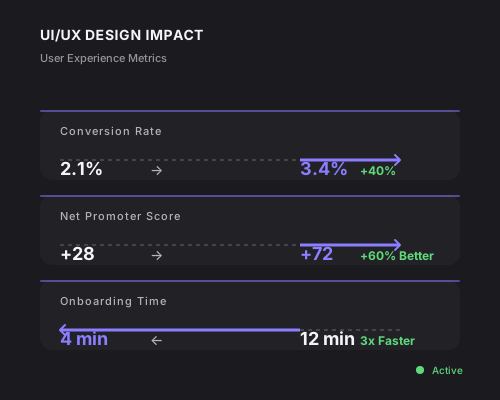
“Cognitive Increase didn't just make our dashboard look better — they fundamentally changed how users interact with AI features. The confidence indicators alone cut our support tickets in half.”
Sarah Chen
VP of Product, FinFlow
Questions
UI/UX Design FAQ
Common questions about our design process, deliverables, and AI UX expertise.
Ready to Automate
Your Business?
We'll analyze your workflows, identify your top automation opportunities, and estimate the ROI — no commitment required.