Ask Your Docs,
Get Cited Answers
Internal "ask your docs" experience with permissioned search, citation tracking, and audit logs — so your team finds the right answer in seconds, not hours.

Who It's For
Built for Teams That Need
Trusted Answers
Whether you need compliance-ready document search or just want your team to stop wasting hours hunting for answers.
Operations & Finance Managers
You need your team to find the right SOP, policy, or procedure instantly — with auditable answers you can trust.
CTOs & Product Owners
You need a maintainable RAG architecture that integrates with your stack, scales with your docs, and doesn't hallucinate.
Enterprise IT & Security
You need role-based access controls, audit logs for every query, and guarantees that sensitive docs stay protected.
Knowledge Workers
You're tired of searching across 5 different tools to find one answer. You want a single search that actually works.
Problems We Solve
Knowledge Chaos
Slowing Your Team
Scattered docs, unreliable AI answers, and no audit trail — these problems cost your team hours every day.
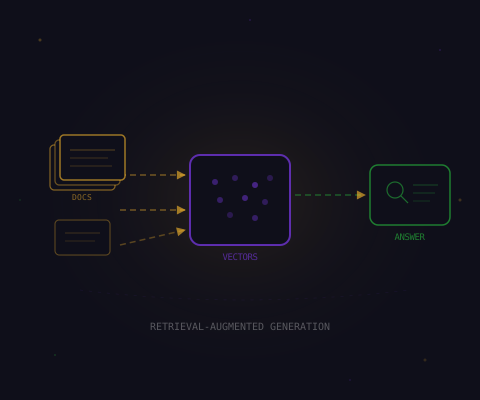
People can't find the right SOP or policy when they need it
Answers in seconds, not hours
Knowledge is scattered across docs, wikis, drives, and Slack
One search across all sources
AI answers are unreliable without grounding in real documents
Every answer cites its source
Compliance needs traceability — 'where did this answer come from?'
Full citation + audit trail
Sensitive documents need access controls that AI respects
Role-based permissioned search
Keeping the knowledge base current as docs change
Auto-sync and re-indexing
What We Build
Intelligent Document
Search & Q&A
Natural language search with permissioned access, citations on every answer, and grounding that prevents hallucinations.
Ask Your Docs
Natural language search across policies, SOPs, product docs, and internal wikis. Ask a question, get a precise answer.
Permissioned Search
Role-based access controls ensure users only see documents they're authorized to access. Permissions sync from your identity provider.
Citations & Source Tracking
Every answer shows exactly which document, section, and paragraph it came from. Full traceability for compliance.
Grounding & Validation
Answers are strictly grounded in your approved documents. Confidence scoring and fallback flows prevent hallucinations.
Answer Experience
Every Answer
Cited & Verified
Users don't just get answers — they get linked sources, confidence scores, and smart fallbacks when the AI isn't sure.
Citations on Every Answer
Each response links directly to the source document, section, and paragraph — so users can verify and go deeper.
Confidence Indicators
Visual confidence scores show how certain the AI is. Low-confidence answers are flagged with alternative suggestions.
Fallback & Escalation
When the AI isn't sure, it says so — and offers refined search suggestions or routes to a subject matter expert.
What You Get
Complete Knowledge
Base Package
From document ingestion to citation-enabled Q&A — everything needed for a production-ready knowledge base.
Document Ingestion
- Multi-source ingestion (docs, wikis, drives, databases)
- Automatic chunking and indexing strategy
- Scheduled re-sync for updated documents
- Format support: PDF, DOCX, HTML, Markdown, Confluence
Permissions & Access
- Role-based access control model
- Identity provider sync (SSO, LDAP, Azure AD)
- Document-level and section-level permissions
- Audit log for every query and access event
Q&A Experience
- Citation-enabled natural language Q&A
- Confidence scoring with fallback flows
- Conversational follow-ups with context memory
- Web UI and API access for integrations
Quality & Guardrails
- Grounding rules to prevent hallucinations
- Answer validation against source documents
- Feedback loop for continuous improvement
- Admin dashboard for quality monitoring
Architecture
How It All
Fits Together
Five layers — from document ingestion to audit analytics — with permissioned retrieval and grounded answer generation.
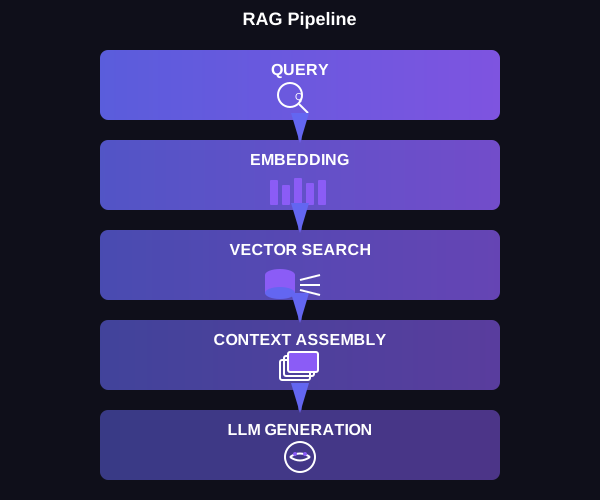
Document Sources
SOPs, policies, product docs, wikis, Confluence, Google Drive, SharePoint — all your knowledge in one pipeline.
Ingestion & Indexing
Automatic chunking, embedding generation, and vector storage. Scheduled re-sync keeps the index current as docs change.
Retrieval Layer
Permissioned semantic search that respects role-based access. Only returns documents the user is authorized to see.
Answer Generation
LLM generates answers strictly grounded in retrieved documents. Every answer includes citations, confidence scores, and source links.
Audit & Analytics
Every query logged with user, timestamp, documents accessed, and answer generated. Usage analytics for admin oversight.
Timeline
From Planning to
Production in 3-5 Weeks
Discovery, ingestion, Q&A build, and launch — with quality benchmarks at every stage.
Discovery & Planning
Inventory document sources, define permission model, plan ingestion strategy, and set quality benchmarks.
Ingestion & Indexing
Connect document sources, run initial ingestion, build vector index, and configure permission-aware retrieval.
Q&A Build & Test
Build citation-enabled Q&A interface, implement grounding rules, test accuracy against benchmark questions.
Launch & Optimize
Deploy to production, team training, set up scheduled re-syncs, and begin continuous quality improvement.
Security & Privacy
Your Documents,
Your Control
Role-based access, full audit logs, and data that never leaves your infrastructure. Built for compliance-first organizations.
Role-Based Access Controls
Users only see documents they're authorized to access. Permissions sync from your identity provider (SSO, LDAP, Azure AD).
Query Audit Logs
Every search query, document access, and generated answer is logged with user identity, timestamp, and full context.
Data Stays in Your Environment
Documents never leave your infrastructure. We can deploy fully within your cloud (AWS, GCP, Azure) with no external data transfer.
No Model Training on Your Data
Your documents are never used to train any AI models. Strict data boundaries with encryption at rest and in transit.
How HealthBridge AI Deployed Secure Knowledge Search for 500+ Staff
HealthBridge's clinical and operations teams spent hours searching across 12 different document repositories for policies, protocols, and compliance guidelines.
Deployed permissioned RAG system across all document sources with role-based access, citation tracking, and compliance-ready audit logs.
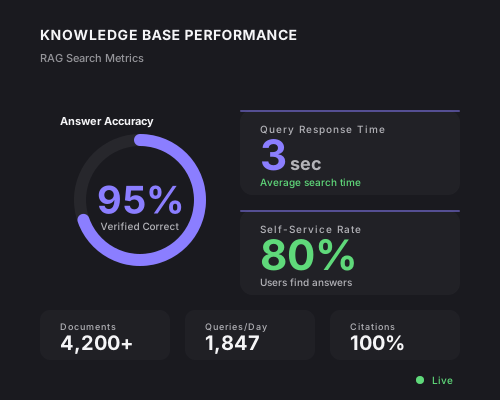
90% reduction in document search time, 100% citation coverage on answers, and full audit trail for regulatory compliance.
“The security-first approach was critical for us. We deployed AI without compromising compliance — something we couldn't achieve with other vendors.”
Dr. Lena Müller
CTO, HealthBridge AI
Questions
Knowledge Base FAQ
Common questions about document ingestion, permissions, citations, and deployment.
Ready to Automate
Your Business?
We'll analyze your workflows, identify your top automation opportunities, and estimate the ROI — no commitment required.